Features
A complete manual QA workspace
Pinned to the Chrome side panel — no cloud, no subscriptions, no AI. Here's what you can do with it.
Capture
Pin QA Workspace beside the page under test and grab evidence as you go.
Side panel workspace
Run QA Workspace alongside any tab using the Chrome side panel — no extra window juggling.
Learn more →Screenshot capture
Capture the active tab and attach screenshots to the current step with optional caption.
Learn more →Screenshot annotator
Arrows, rectangles, pen, highlighter, text, and PII blur — with Snipping Tool style cursors.
Learn more →Companion overlay
Floating companion to mark Pass / Fail / Blocked / Skip without leaving the page under test.
Learn more →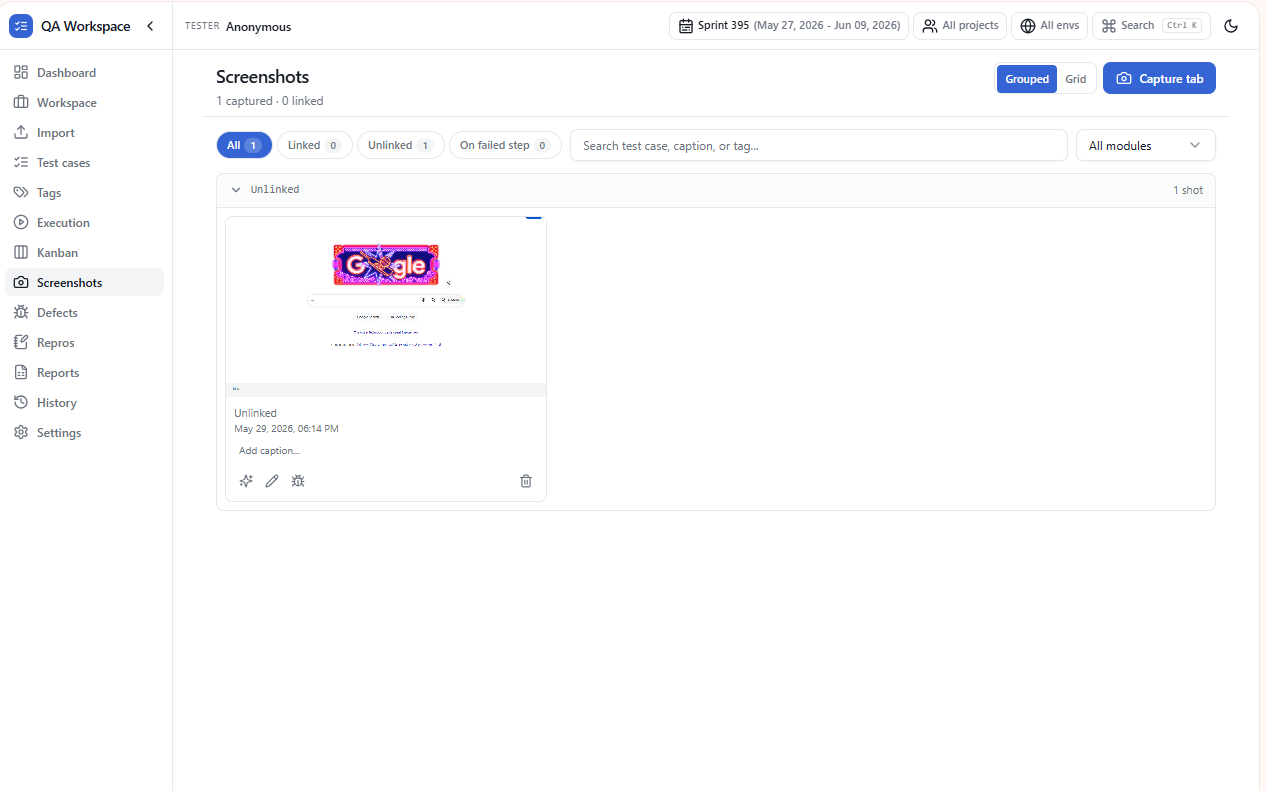
Screenshots
Capture and annotate evidence per step.
Plan
Bring your existing Excel and CSV test suites in and organize them by story.
Excel & CSV import
Drag-and-drop test cases from .xlsx or .csv with column validation and a pre-import preview.
Learn more →Test case management
Stories, modules, search, filters, favorites, and expandable steps in one tidy list.
Learn more →Tags & filters
Tag cases as smoke / regression / P0 and slice the runner and dashboard by tag combinations.
Learn more →Workspace & projects
Group suites under projects and teams; map runs to Dev / SIT / UAT environments.
Learn more →Dashboard
Pass rate, module breakdown, sprint burndown, and recent activity at a glance.
Learn more →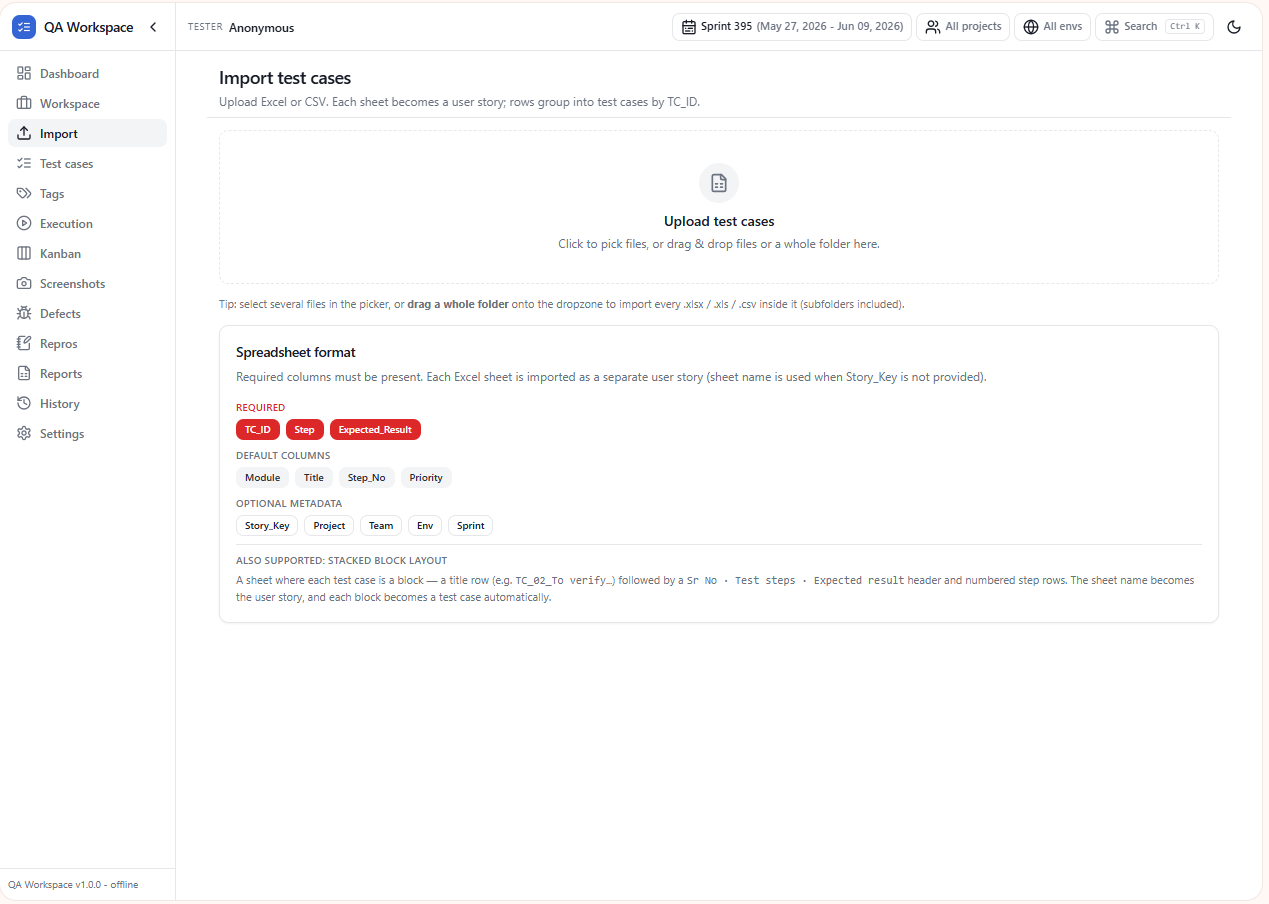
Import
Excel and CSV import with validation preview.
Execute
Drive runs from the side panel with shortcuts, status, notes, and defects.
Execution runner
Step-by-step runner with autosave, timer, status marking, and quick notes per step.
Learn more →Kanban board
Drag-and-drop test cases between Pending / In progress / Passed / Failed / Blocked lanes.
Learn more →Keyboard shortcuts
Alt+N / Alt+P navigation, Alt+1–4 for status, Alt+S screenshot, Alt+M defect — fully customizable.
Learn more →Defect tracking
Log defects with severity, priority, environment, and links back to failed steps.
Learn more →Repros
Save reproduction recipes — steps, payloads, environment — and link them to defects.
Learn more →Task tracking
Track retests, go-live milestones, and today’s work. Suggestions appear when defects are ready to verify.
Learn more →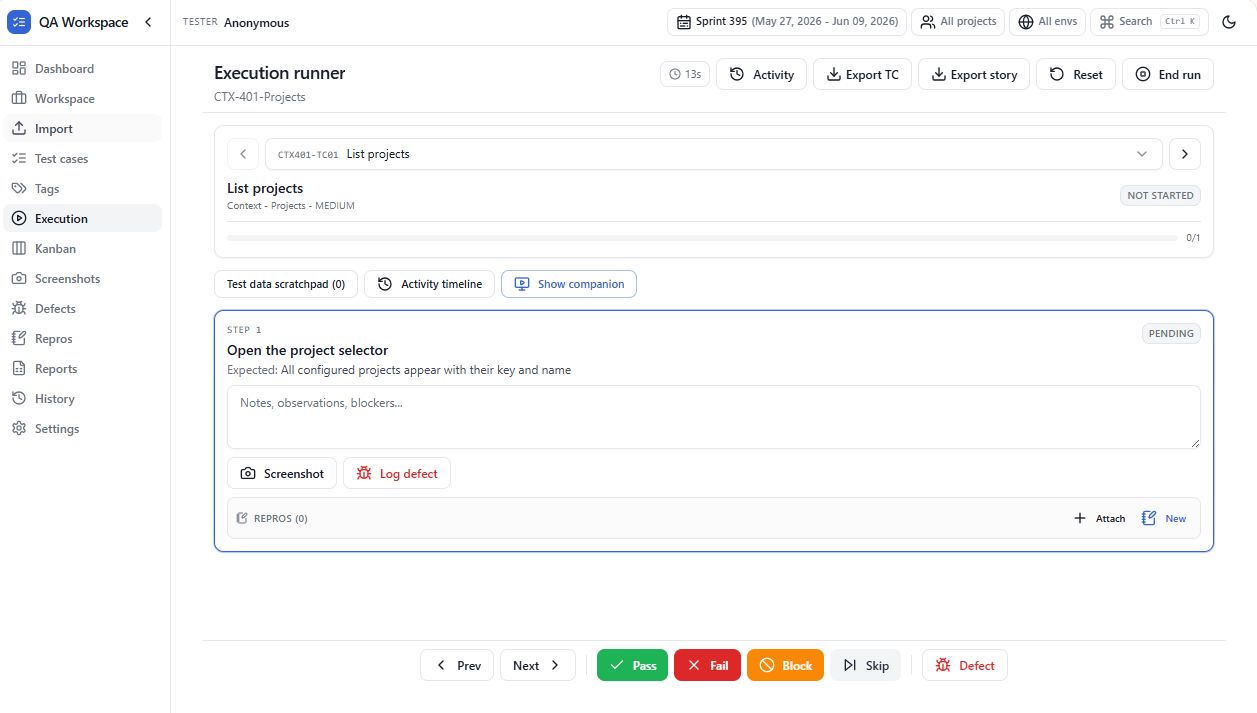
Execution runner
Step-by-step execution with timer and shortcuts.
Report
Export polished PDF / Excel / CSV reports for stakeholders in one click.
PDF / Excel / CSV reports
Generate execution reports with summaries, notes, screenshots, and defect tables.
Learn more →Run history
A locally-stored audit trail of every step status change, screenshot, and defect.
Learn more →Local-first storage
Suites, runs, screenshots, and settings live in chrome.storage.local on your device.
Learn more →Settings & customization
Theme, shortcuts, tester profile, companion behavior, and one-click data export or wipe.
Learn more →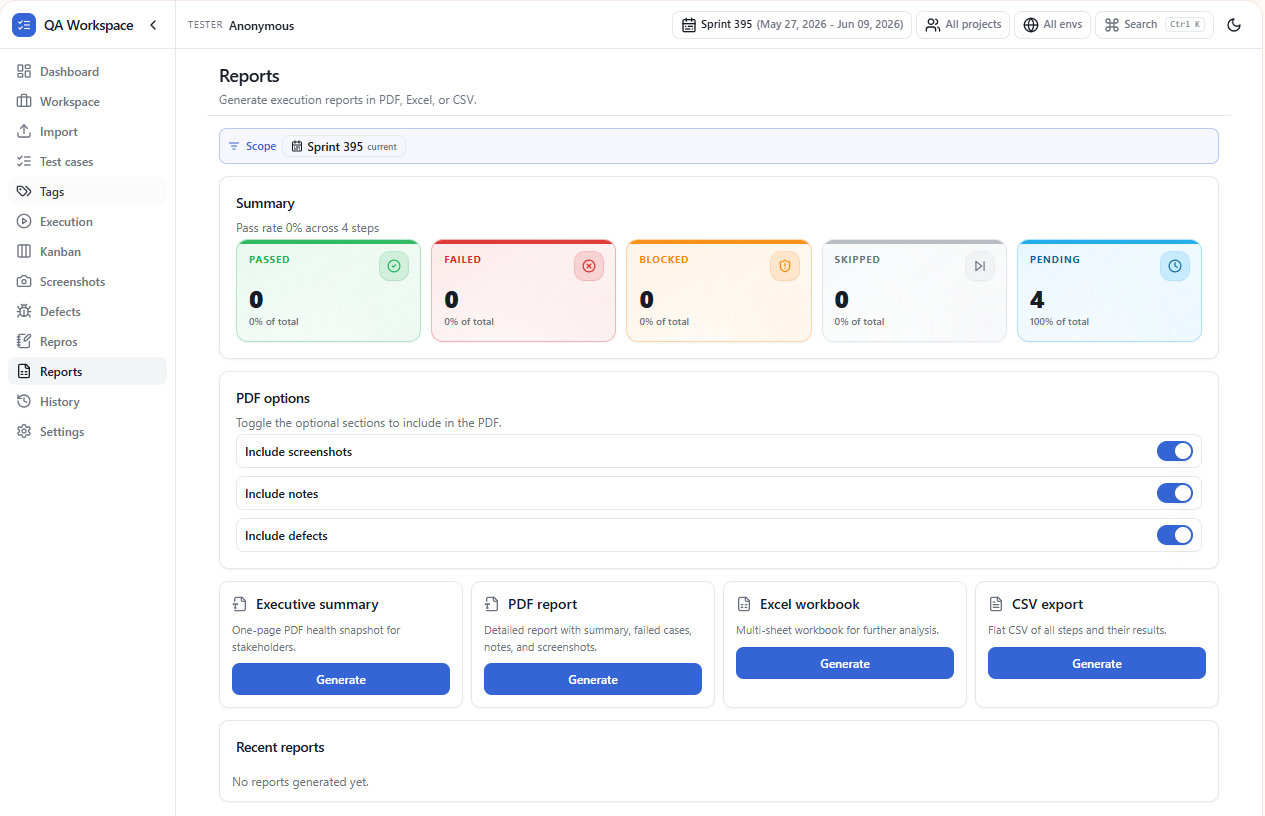
Reports
PDF, Excel, and CSV export.
Privacy
Offline-first by design. No accounts. No telemetry. No AI. Ever.
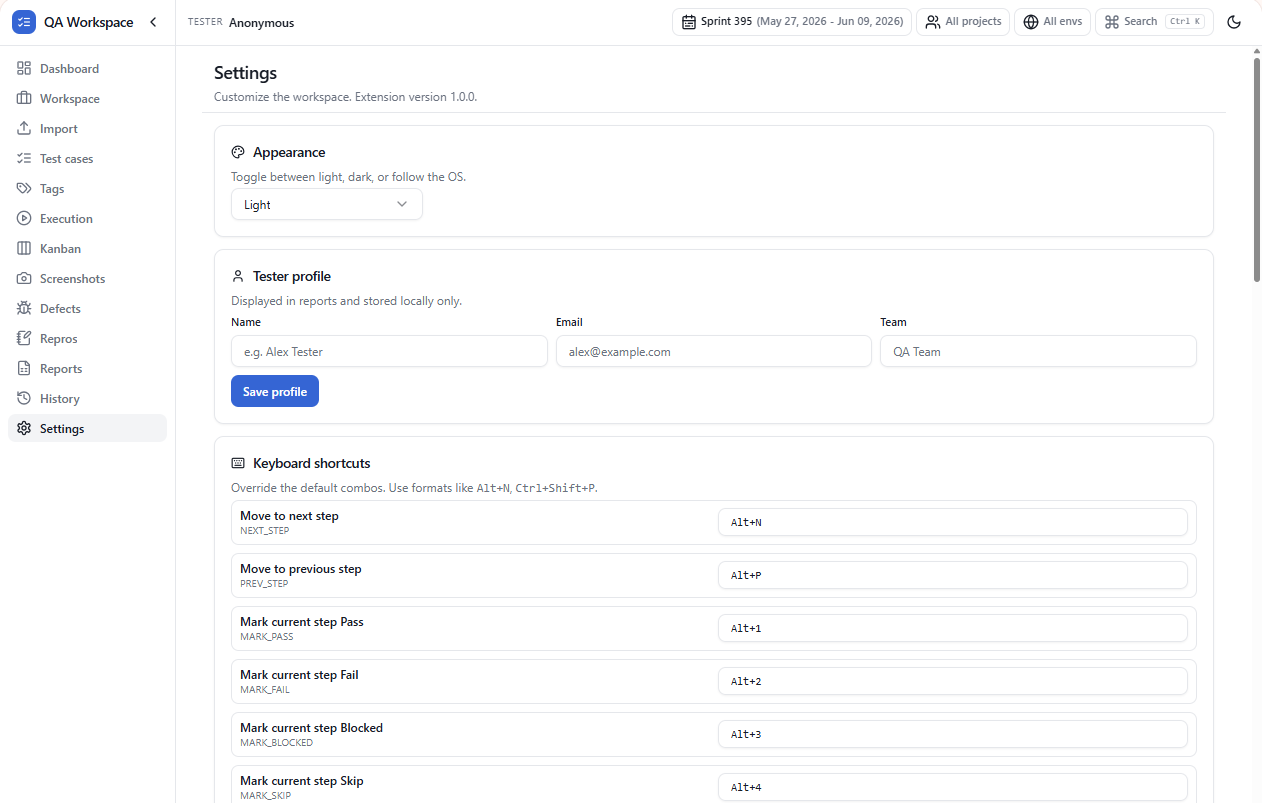
Settings
Theme, profile, shortcuts, and workspace reset.
Keyboard shortcuts
Drive runs without touching the mouse
Defaults shipped with the extension. Open Settings → Shortcuts to customize any binding.
| Shortcut | Action | Scope |
|---|---|---|
| Alt + N | Next step | Runner |
| Alt + P | Previous step | Runner |
| Alt + 1 | Mark step Pass | Runner |
| Alt + 2 | Mark step Fail | Runner |
| Alt + 3 | Mark step Blocked | Runner |
| Alt + 4 | Mark step Skip | Runner |
| Alt + S | Capture screenshot | Runner |
| Alt + M | Log defect for current step | Runner |
| / | Focus search in test case list | List |
| Esc | Close dialog / cancel edit | Workspace |
All shortcuts are customizable in Settings → Shortcuts inside the extension.
Excluded
No AI
No model calls, no prompt logging, no inference services in the loop.
Excluded
No telemetry
Zero analytics or beacons. The extension never phones home.
Excluded
No cloud
Suites, runs, screenshots, and settings stay on your device.
Try it in your next sprint
Install free from the Chrome Web Store.