Capability
Execution runner
The runner is where manual testing actually happens. It pins to the Chrome side panel next to the application under test, shows one step at a time, and records the outcome with a single keystroke.
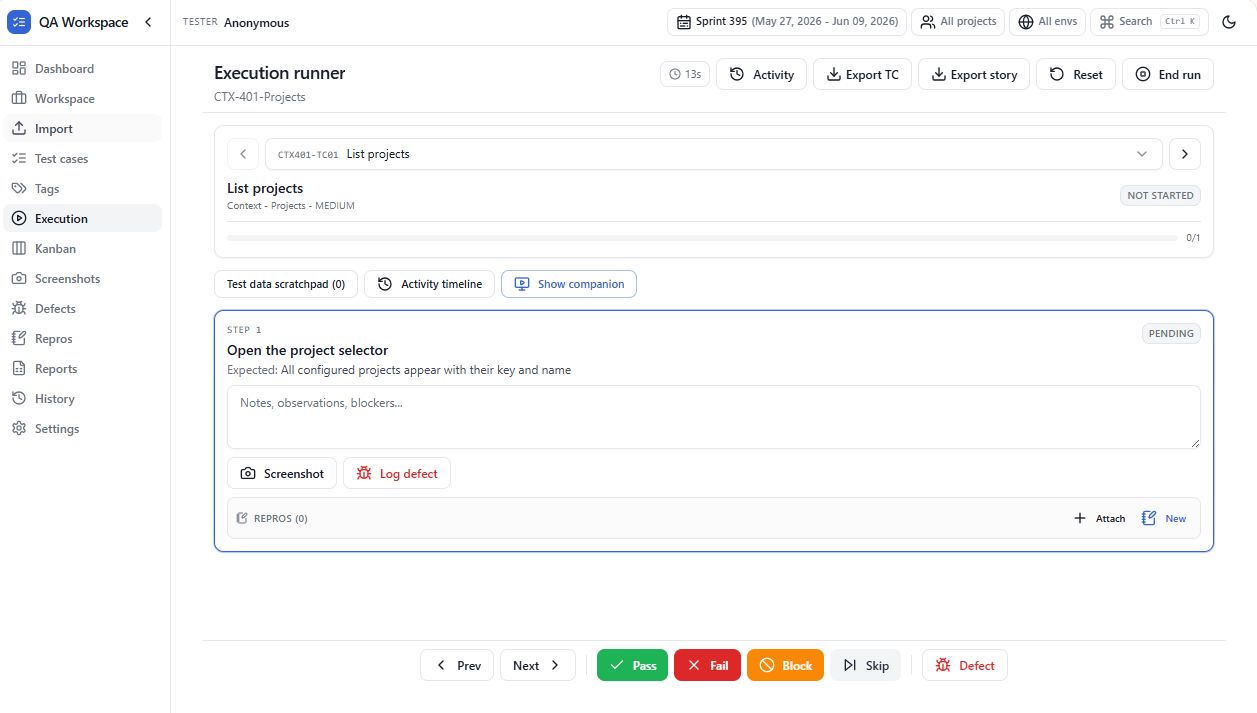
Step-by-step focus
Only the active step is highlighted. The expected result, attached evidence, and comment box stay visible so you never lose context while clicking through the app.
Status options
- Pass — moves to the next step.
- Fail — opens the defect drawer pre-filled with the step context.
- Blocked — for environment / dependency issues.
- Skip — when a precondition is not met.
- Not run — default until a status is set.
- Pass all steps — marks every step of the test case passed in one click.
Resume any time
Runs are persisted as you go. Close the browser, reopen, and the runner picks up on the exact step you left.
Scoped to your sprint
The runner honours the sprint, project, and environment scope you pick in the top bar. The story picker only lists suites in that scope, and a scope banner sits above the runner so you can adjust or clear it — so you never accidentally run last sprint's tests. The same scope applies in the floating companion.
Use cases
Single-tester run
Pin the runner in the side panel and drive a 100-case regression sweep with the keyboard alone.
Pause & resume
Close the browser mid-run — your next session resumes at the exact step with all notes intact.
Defect-as-you-go
Mark a step Fail and Alt+M opens the defect form pre-linked to that step.
Multi-tester handover
History records who marked what, so handover between testers is a non-event.
Tips
- Alt+1..4 sets status; Alt+N/P moves between steps.
- The notes field saves on blur — never lose a half-typed observation.
- Use Pass all steps for clean, expected-path runs, then only revisit the steps that failed.
- Switch the sprint in the top bar to move the whole runner to a different sprint's suites in one click.
- Companion overlay mirrors the runner so you don't have to switch focus to the side panel.