Capability
Companion overlay
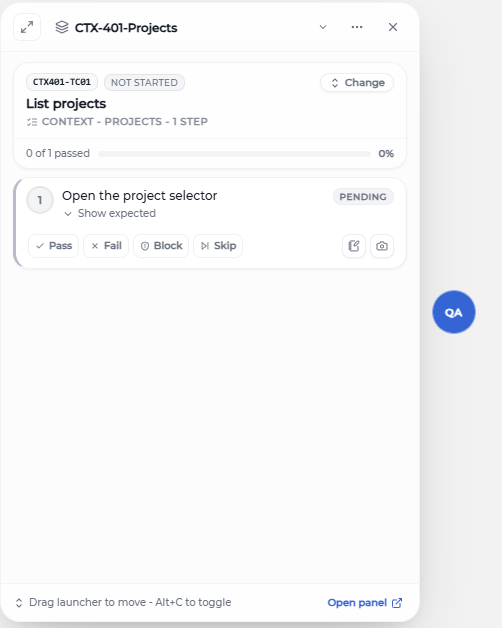
A draggable floating launcher pinned to the page under test. One click to expand a mini runner, mark a status, or capture evidence — without leaving the page.
How to use it
- 1 The companion mounts automatically on every page where the extension is allowed.
- 2 Drag the launcher to a corner that doesn't cover your test target.
- 3 Click the launcher to expand the mini panel — see the active test case and step list.
- 4 Mark status, attach a screenshot, or jump to the side panel from the same panel.
- 5 Use "Pass all steps" to mark the whole test case passed in one click.
- 6 Press Alt+C to toggle, Alt+S to capture — works while the panel is collapsed.
Use cases
Single-monitor testers
No second monitor? Park the companion in the corner and keep the page under test full-width.
Complex web apps
When the side panel's narrow width is awkward, the floating companion stays out of the layout while you work in the host page.
Quick captures from any site
<kbd>Alt</kbd>+<kbd>S</kbd> captures even when the side panel is closed — the companion handles capture and the caption dialog locally.
Dismissible per session
Hide the launcher on pages where it's in the way — it stays gone for that tab until you reopen it.
Tips
- Shadow DOM isolation keeps the companion's CSS from interacting with the host page.
- "Pass all steps" is handy for expected-path runs — then reopen only the steps you need to fail or block.
- Scroll inside the panel doesn't scroll the host page — overscroll is contained.
- Captures from the companion still link to the active step if there is one; otherwise they save unlinked for later attachment.